PROJECT: Deadline Manager
This portfolio summarizes what I have contributed in a Software Engineering team project in CS2103T. Within 6 weeks, our team of 5 students has transformed an existing code base (about 10 kLOC) into a new application called Deadline Manager.
1. Overview
Deadline Manager is a Java application to help users manage deadlines. Besides basic features like add/edit/remove tasks and import/export task lists, Deadline Manager supports recurring tasks, complex filtering, flexible sorting, tags, and attachments.
For more information, visit [our GitHub page].
2. Summary of Contributions
-
Major enhancement: added the ability to manage recurring tasks in Deadline Manager
-
What it does: It allows users to add and complete recurring tasks in Deadline Manager. Users can use the
addcommand with the frequency parameter (in days) to add a recurring task. To complete a task, users can use thecompletecommand. Completing a non-recurring task will delete the task. Completing a recurring task will shift the deadline of the task to the next occurrence. -
Justification: This feature allows users to manage recurring tasks, which are very common. The
completecommand provides a natural way for users to mark a task as completed. -
Highlights: Implementing this feature requires modifying the
Taskclass, the most basic class in the code base. A minor change in this class may take 4-5 hours of modifying parts of code which are dependent onTask.
-
-
Minor enhancement: added
priority,frequencyand removed unnecessary fields in theTaskclass-
Highlights: Changes in the
Taskclass take a lot of time because it is used at a lot of places in the code base.
-
-
Code contributed: [Commits]
-
Other contributions:
3. Contributions to the User Guide
Given below are excerpts of sections that I contributed to the user guide. They showcase my ability to write documentation targeting end-users. |
3.1. Adding a task: add
Adds a task to the deadline manager
Format: add n/NAME [p/PRIORITY] [f/FREQUENCY] d/DEADLINE [t/TAG]…
| A task can have any number of tags (including 0) |
| You can have two tasks with the same attributes! |
Examples:
-
add n/Homework d/01/01/2018
Adds a task with nameHomeworkwith a deadline on 1st January 2018. BecausePRIORITYandFREQUENCYare omitted, this task has priority 0 (no priority/lowest priority) and frequency 0 (non-recurring task). -
add n/Assignment 2 d/1/1/2018 p/1
Adds a task with nameAssignment 2with a deadline on 1st January 2018 with priority 1 (highest priority). -
add n/v1 milestone d/9/10/2018 t/CS2103T t/Project p/2
Adds a task with namev1 milestonewith a deadline on 9th October 2018 with priority 2 (second highest priority). It is additionally tagged with 2 tags:CS2103TandProject. -
add n/Clean the house d/01/01/2018 f/7
Adds a task with nameClean the housewith a deadline on 1st January 2018 with frequency 7 (this is a recurring task).
3.2. Completing a task : complete
Completes an existing task in the deadline manager.
If the task is not recurred (the frequency is equal to 0), the task will be deleted.
Otherwise, the deadline will be shifted to the next occurrence.
Format: complete INDEX
Example:
-
clear
Starts with an empty task list
add n/Homework d/01/01/2018
Adds a non-recurring task.
add n/Clean the house d/01/01/2018 f/7
Adds a recurring task with frequency 7. See Figure 3.3.1 below.
complete 2
Completes the second task in the task list. Because the task is a recurring task, the deadline will be changed to 08/01/2018. See Figure 3.3.2 below.
complete 1Completes the first task in the task list. Because the task is a non-recurring task, it will be deleted. See Figure 3.3.3 below.
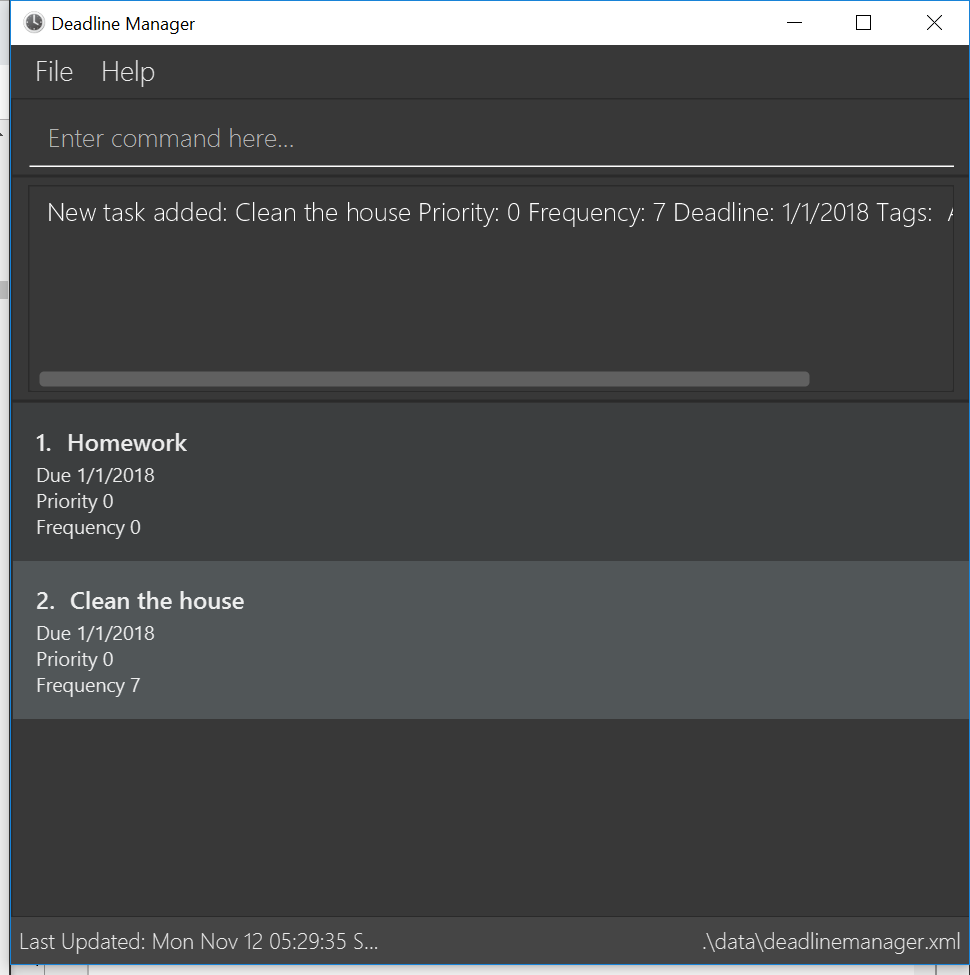
clear command and two add commands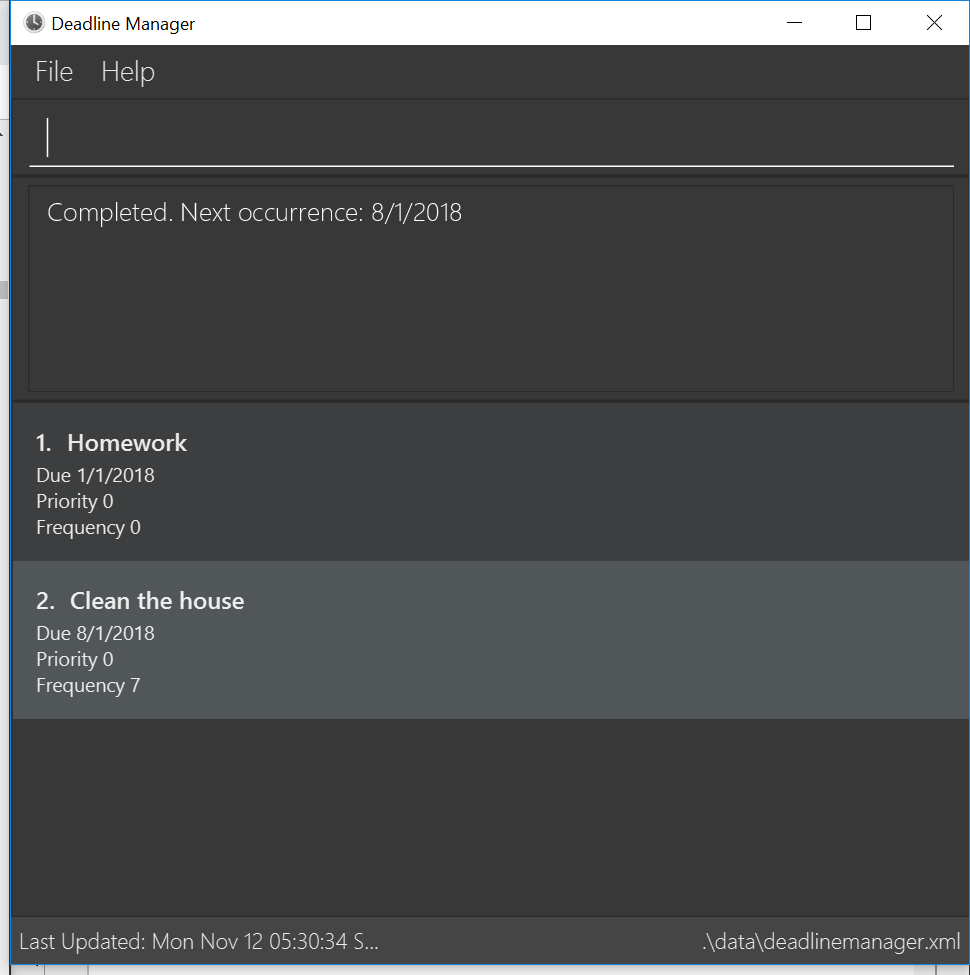
complete 2 command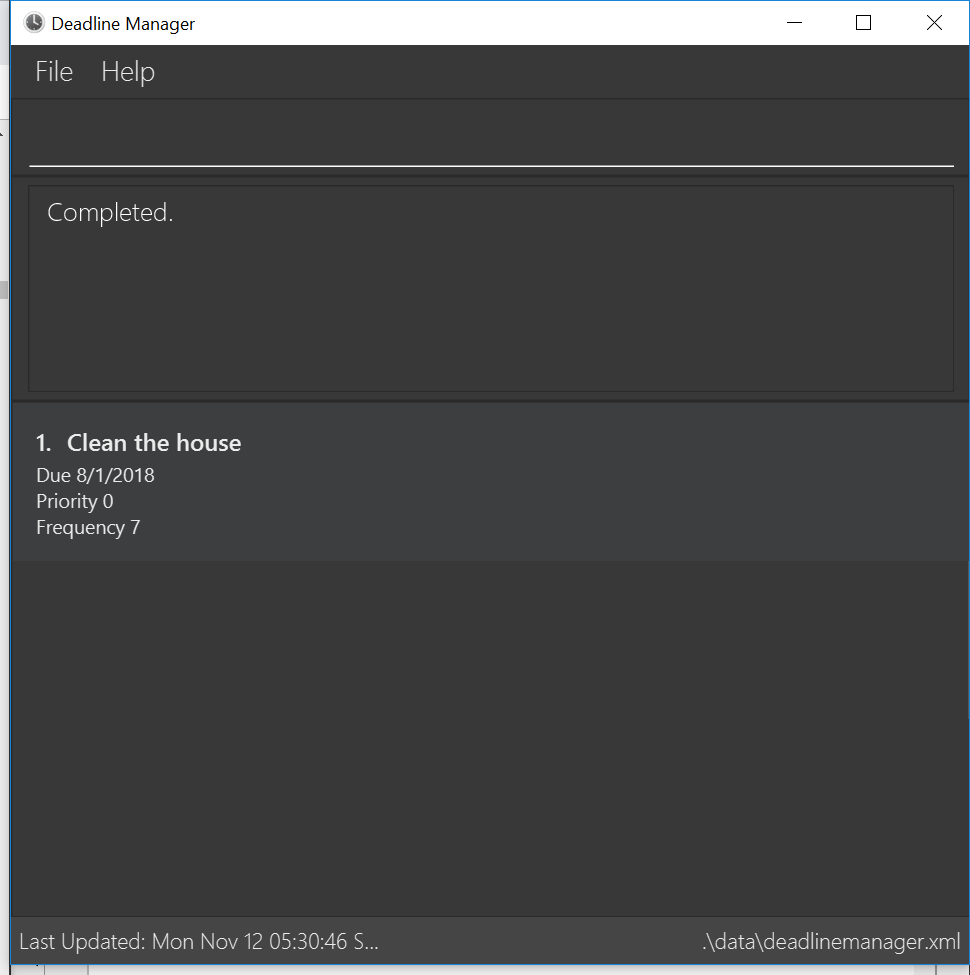
complete 1 command4. Contributions to the Developer Guide
Given below are sections I contributed to the Developer Guide. They showcase my ability to write technical documentation and the technical depth of my contributions to the project. |
4.1. Add feature
The add command enables the user to create a new task with a name and a deadline.
The user can also provide additional information including priority, frequency and tags.
Given below is a sequence of steps, illustrating the interaction between AddCommandParser, AddCommand and Model:
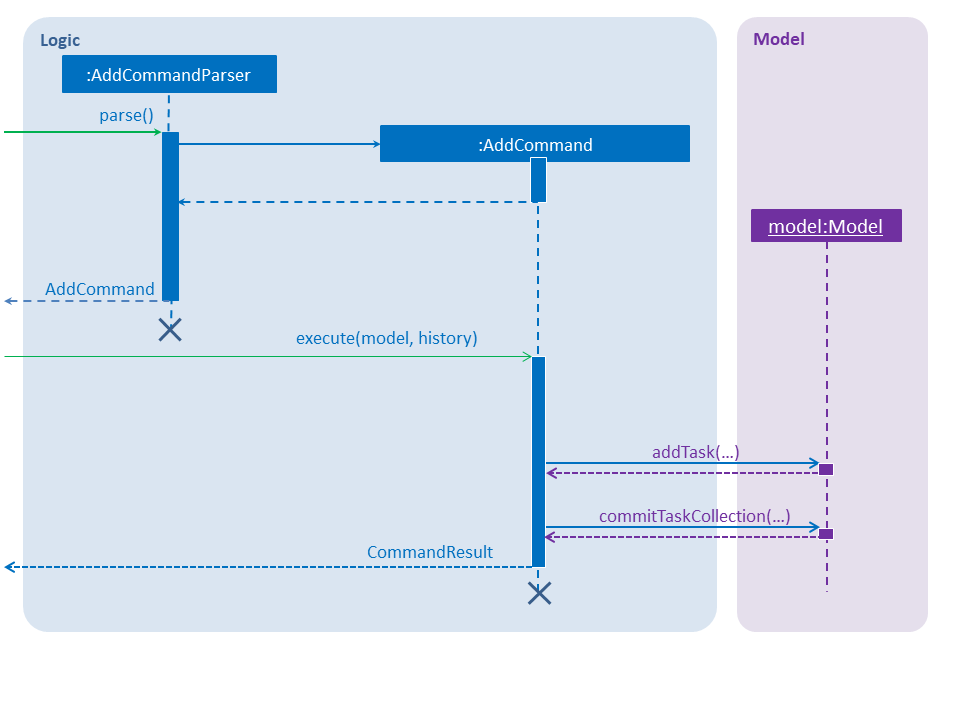
Step 1. The user enters an add command.
Step 2. The AddCommandParser#parse method is invoked.
The AddCommandParser receives the command with the arguments given as a string.
Step 3. The AddCommandParser interprets the arguments and constructs an AddCommand.
Step 4. The AddCommand with a Task specified by the user is returned.
Step 5. The AddCommand#execute method is invoked.
Step 6. The Model is updated: The Model#addTask method and the Model#commitTaskCollection method are invoked.
Step 7. A CommandResult object is returned.
4.2. Complete feature
The complete command provides users a natural way to complete a task:
either delete a task if it is a non-recurring task
or shift the deadline to the next occurrence if the task is a recurring task.
4.2.1. Current implementation
The complete feature is implemented by CompleteCommand and CompleteCommandParser.
After the task specified by the user is retrieved, the CompleteCommand will consider these two cases:
-
If the task is a non-recurring task, it will be deleted.
-
Otherwise, the task will be updated using the following formula:
NewDeadline = OldDeadline + Frequency
4.2.2. Sequence flow
Given below is a sequence of steps, illustrating the interaction between CompleteCommandParser, CompleteCommand, and Model:
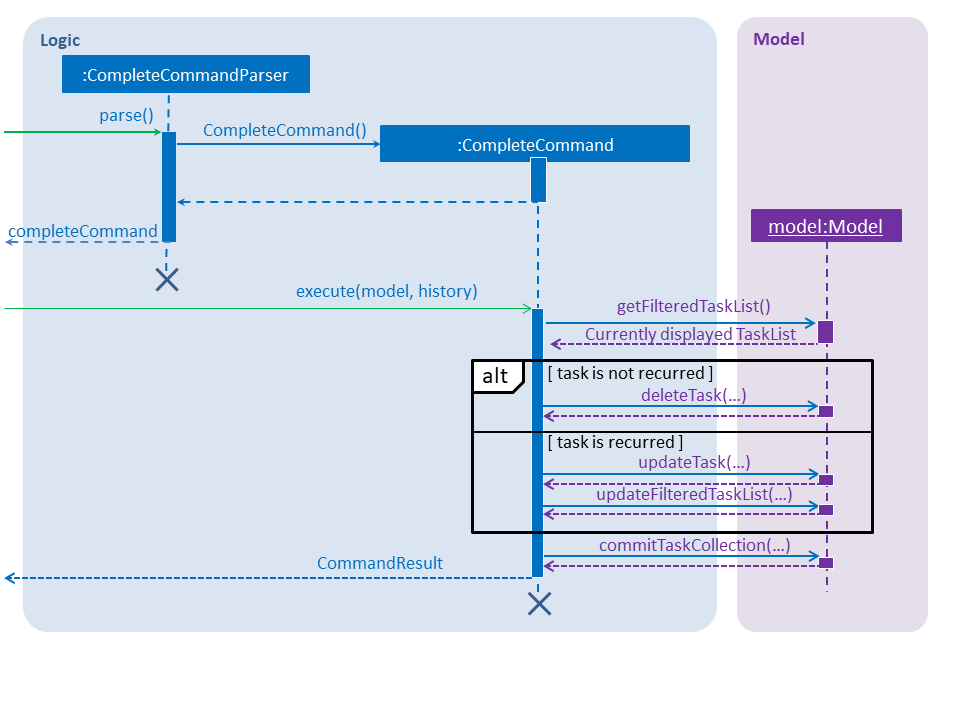
Step 1. The user enters a complete command with the index of a task in the task list.
Step 2. The CompleteCommandParser#parse method is invoked.
The CompleteCommandParser receives the command with the arguments given as a string.
Step 3. The CompleteCommandParser interprets the arguments and constructs a CompleteCommand.
Step 4. The CompleteCommand with the index specified by the user is returned.
Step 5. The CompleteCommand#execute method is invoked.
Step 6. The task identified by the user is retrieved from the Model.
Step 7. The Model is updated:
If the task is a non-recurring task, Model#deleteTask is invoked to delete the task.
Otherwise, Model#updateTask (followed by Model#updateFilteredTaskList) is invoked
with a new Task where the deadline is updated.
Step 8. The Model#commitTaskCollection method is invoked.
Step 9. A CommandResult object is returned.